
Reconcile an account
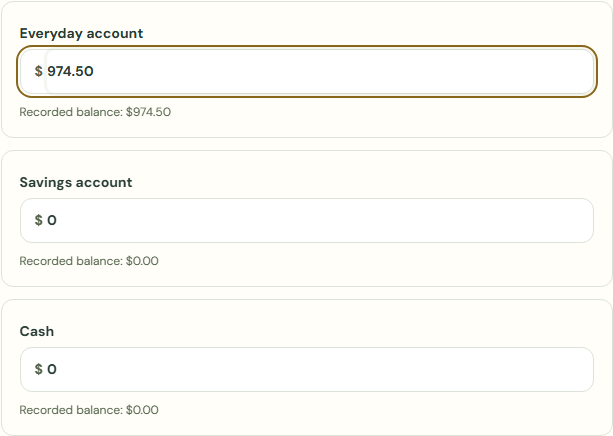
Enter the balances you see now, after the payments above. Remaining differences are corrections, not income or spending.
Confirm what you have.
Enter the balances you see now, after the payments above. Remaining differences are corrections, not income or spending.
- Choose Weekly review.
- Check Bills & commitments.
- Choose I reviewed my commitments, including any paid or missing items..
- Choose Continue to balances.
- Complete Everyday account.
 Enlarge screenshot
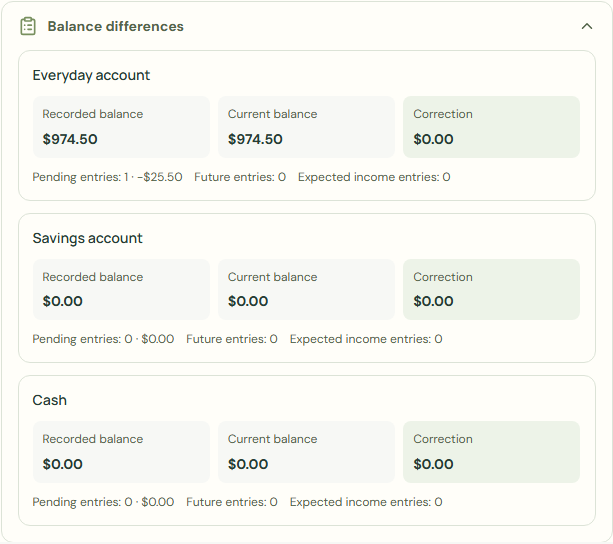
Balance differences
For reconciliation, enter debt as a negative balance and account credit as a positive balance.
- Choose Balance differences.
- Check Recorded balance.
- Check Current balance.
- Check Correction.
 Enlarge screenshot
What should happen
- Choose Continue.
- Check Protect commitments for.
- Check Goal reserves.
- Choose See my plan.
- Check Current balance.
- Choose Finish my review.
Worked example
Example balance: $1,000.00 − $25.50 = $974.50.
- Enter 974.50 in Everyday account.
- Choose Balance differences.
- Check Recorded balance.
- Check Correction.
- Choose Continue.
Correction: $974.50 − $974.50 = $0.00
Current balance: $974.50 → $974.50
Common mistakes and fixes
Count the actual balance, review it, and save a correction. This changes cash, not income or spending. For foreign accounts, also enter the corrected historical book value; use Update valuation for market-value changes.
- Check Your transactions.
- Check Current balance.
- Choose Count or correct cash.
Wait for save confirmation. If an error appears, correct it before continuing.