
Delete and restore records
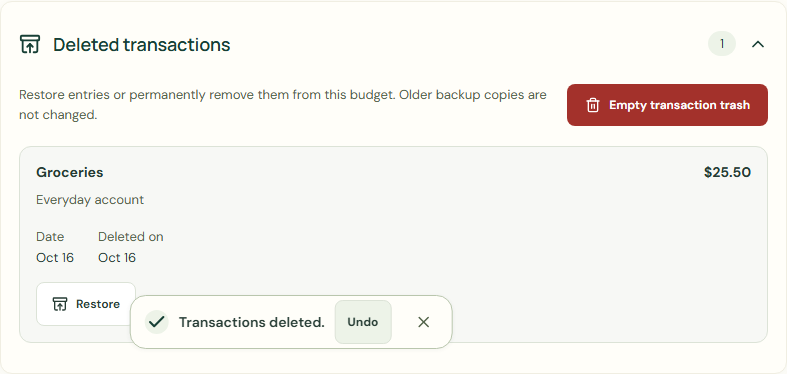
Restore entries or permanently remove them from this budget. Older backup copies are not changed.
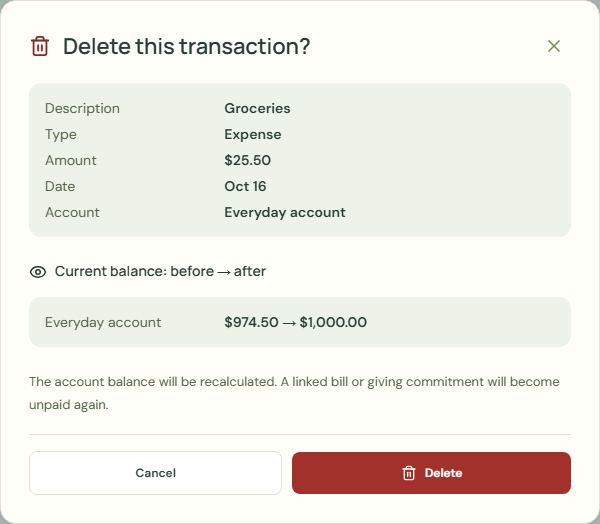
Delete this transaction?
- Choose My money.
- Choose Your transactions.
- Choose Delete.
- Check Current balance.
- Choose Delete.
 Enlarge screenshot
Restore
Cannot restore: the linked bill or giving intention was removed, changed, or already resolved.
- Choose Deleted transactions.
- Check Date.
- Choose Restore.
- Check Your transactions.
- Check Current balance.
 Enlarge screenshot
Delete forever
Permanently delete the selected trash? This cannot be undone in this budget. Older backups may still contain these records.
Restore entries or permanently remove them from this budget. Older backup copies are not changed.
- Choose Deleted transactions.
- Check Date.
- Choose Delete forever.
- Choose Delete forever.
Worked example
Example balance: $1,000.00 − $25.50 = $974.50.
- Check Groceries.
- Choose Delete.
- Check Current balance.
- Choose Delete.
- Choose Deleted transactions.
- Choose Restore.
- Check Your transactions.
Current balance: $974.50 → $1,000.00 → $974.50
Common mistakes and fixes
Permanently delete the selected trash? This cannot be undone in this budget. Older backups may still contain these records.
- Choose Deleted transactions.
- Check Date.
- Choose Restore.
Wait for save confirmation. If an error appears, correct it before continuing.