
Attach a receipt
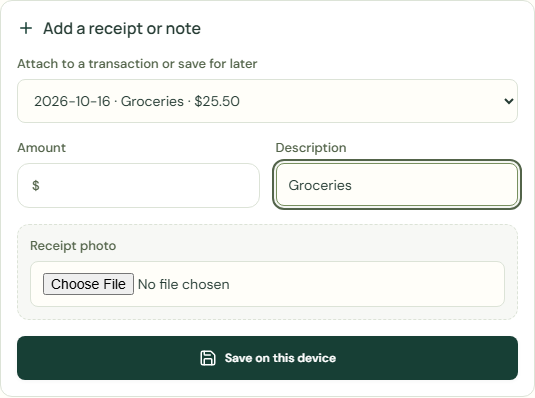
Save a receipt, amount or note now and record the transaction later. Review an inbox item before adding it to your budget, or attach a receipt to an existing transaction. Saving an inbox item does not change your balances.
Receipt photo
Save a receipt, amount or note now and record the transaction later. Review an inbox item before adding it to your budget, or attach a receipt to an existing transaction. Saving an inbox item does not change your balances.
- Choose My money.
- Choose Receipts and log-later inbox.
- Complete Attach to a transaction or save for later.
- Complete Receipt photo.
- Complete Description.
- Choose Save on this device.
 Enlarge screenshot
Saved receipts and notes
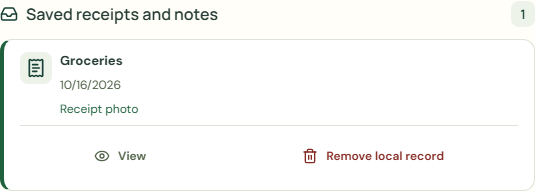
- Check Saved receipts and notes.
- Choose View.
- Check Receipt photo.
- Choose Close.
- Check Current balance.
 Enlarge screenshot
Remove local record
Restore entries or permanently remove them from this budget. Older backup copies are not changed.
- Choose Remove local record.
- Choose Remove local record.
Worked example
Example balance: $1,000.00 − $25.50 = $974.50.
- Choose Receipts and log-later inbox.
- Complete Attach to a transaction or save for later.
- Enter Groceries in Description.
- Complete Receipt photo.
- Choose Save on this device.
- Choose View.
Current balance: $974.50 → $974.50
Save a receipt, amount or note now and record the transaction later. Review an inbox item before adding it to your budget, or attach a receipt to an existing transaction. Saving an inbox item does not change your balances.
Common mistakes and fixes
Save a receipt, amount or note now and record the transaction later. Review an inbox item before adding it to your budget, or attach a receipt to an existing transaction. Saving an inbox item does not change your balances.
- Check Attach to a transaction or save for later.
- Check Your transactions.
Wait for save confirmation. If an error appears, correct it before continuing.