
Split transaction
Use different categories with positive amounts totaling the transaction. Goals, bills and debt links apply to the full payment.
Split transaction
- Choose My money.
- Choose Add transaction.
- Complete Amount.
- Choose Split transaction.
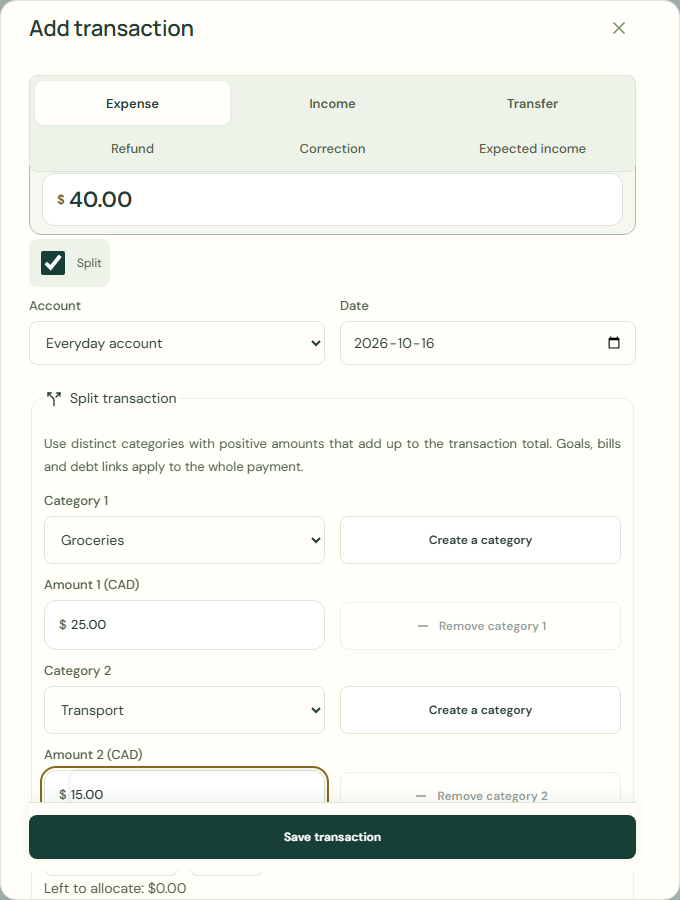 Enlarge screenshot
Add category
Use different categories with positive amounts totaling the transaction. Goals, bills and debt links apply to the full payment.
- Choose Add category.
- Complete Category.
- Complete Amount.
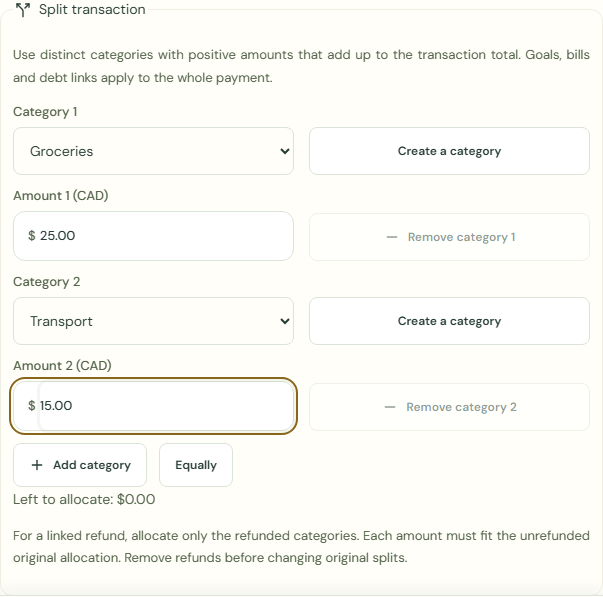 Enlarge screenshot
What should happen
- Check Left to allocate.
- Choose Save transaction.
- Check Your transactions.
Worked example
Example balance: $1,000.00 − $25.50 = $974.50.
- Enter 40.00 in Amount.
- Choose Split transaction.
- Choose Groceries for Category.
- Enter 25.00 in Amount.
- Choose Transport for Category.
- Enter 15.00 in Amount.
- Check Left to allocate.
- Choose Save transaction.
Amount: $25.00 + $15.00 = $40.00
Left to allocate: $0.00
Current balance: $974.50 − $40.00 = $934.50
Common mistakes and fixes
Use different categories with positive amounts totaling the transaction. Goals, bills and debt links apply to the full payment.
- Check Category.
- Check Amount.
- Check Left to allocate.
Wait for save confirmation. If an error appears, correct it before continuing.