
Mark paid
Save to record the expense and settle this bill. Linking an existing expense won’t deduct money again.
Mark paid
- Choose Plans & goals.
- Choose Bills & commitments.
- Choose Mark paid.
 Enlarge screenshot
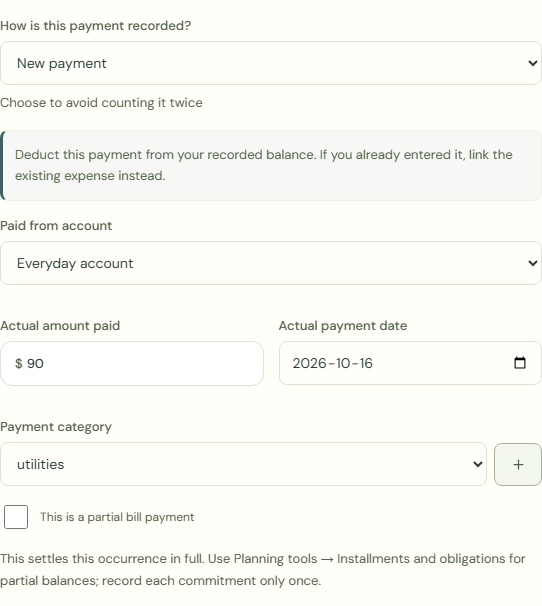
How is this payment recorded?
Choose to avoid counting it twice
 Enlarge screenshot
New payment
Deduct this payment from your recorded balance. If you already entered it, link the existing expense instead.
- Choose New payment.
- Complete Paid from account.
- Complete Actual amount paid.
- Complete Actual payment date.
Link an existing expense
Original date and amount; balance unchanged.
- Choose Link an existing expense.
- Complete Existing expense.
- Check Entry amount.
- Check Entry date.
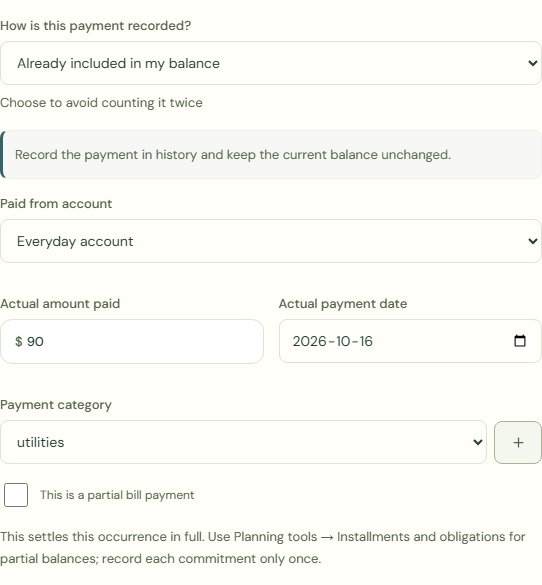
Already included in my balance
Record the payment in history and keep the current balance unchanged.
- Choose Already included in my balance.
What should happen
Record the payment in history and keep the current balance unchanged.
- Choose Mark as paid.
- Check Bills & commitments.
- Check Your transactions.
Worked example
Example balance: $1,000.00 − $25.50 = $974.50.
- Choose New payment.
- Choose Everyday account for Paid from account.
- Enter 90.00 in Actual amount paid.
- Complete Actual payment date.
- Choose Mark as paid.
Current balance: $974.50 − $90.00 = $884.50
Save to record the expense and settle this bill. Linking an existing expense won’t deduct money again.
Common mistakes and fixes
Choose to avoid counting it twice
- Check Your transactions.
- Choose Link an existing expense.
- Complete Existing expense.
Wait for save confirmation. If an error appears, correct it before continuing.