
Plan until payday
Choose a period, review bills and goals, then allocate cleared cash. Income forecasts aren't available cash.
Budget periods
Plan until payday. Exclude expected income.
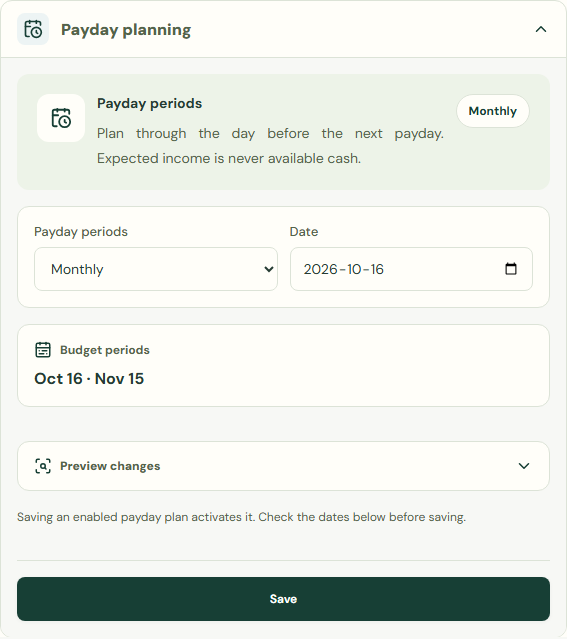
Saving an enabled payday plan activates it. Check the dates below before saving.
- Choose Planning tools.
- Choose Plan until payday.
- Choose Payday planning.
- Complete Payday periods.
- Complete Date.
- Choose Save.
 Enlarge screenshot
Bills & commitments
Choose a period, review bills and goals, then allocate cleared cash. Income forecasts aren't available cash.
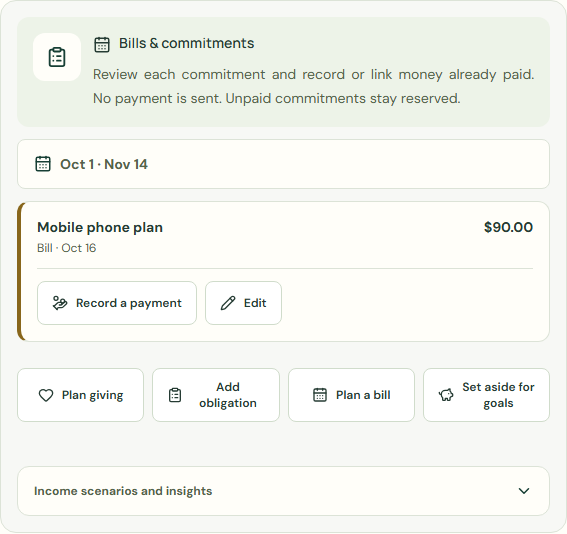
- Choose Bills & commitments.
- Check Bills & commitments.
- Check Goal reserves.
 Enlarge screenshot
Cash envelopes for this period
Monthly and payday plans share allocations; other periods use separate envelopes. Switching keeps plans without adding cash.
Assign cleared cash only. Leftovers carry forward only with rollover. Expenses and refunds update allowances without account transfers.
- Choose Cash envelopes for this period.
- Check Available to allocate.
- Enter the amount to assign in each category you want to fund, review rollover, then save.
- Check Carry remaining money forward.
- Choose Save.
Worked example
Example balance: $1,000.00 − $25.50 = $974.50.
- Check Current balance.
- Choose Monthly for Payday periods.
- Complete Date.
- Choose Save.
- Choose Bills & commitments.
- Check Available to allocate.
Current balance: $974.50 → $974.50
Plan until payday. Exclude expected income.
Common mistakes and fixes
Choose a period, review bills and goals, then allocate cleared cash. Income forecasts aren't available cash.
- Check Current balance.
- Check Bills & commitments.
- Check Available to allocate.
Wait for save confirmation. If an error appears, correct it before continuing.