
Import transactions
Choose or drop a CSV, TSV, JSON, OFX, QFX or QIF file. One account, up to 1,000 entries. Files stay on this device. Check date order and amounts in the preview.
Import transactions
Import requires the statement and account to use the budget currency. Record foreign-currency entries separately with an exchange rate.
Choose or drop a CSV, TSV, JSON, OFX, QFX or QIF file. One account, up to 1,000 entries. Files stay on this device. Check date order and amounts in the preview.
- Choose My money.
- Choose Import transactions.
- Choose CSV file.
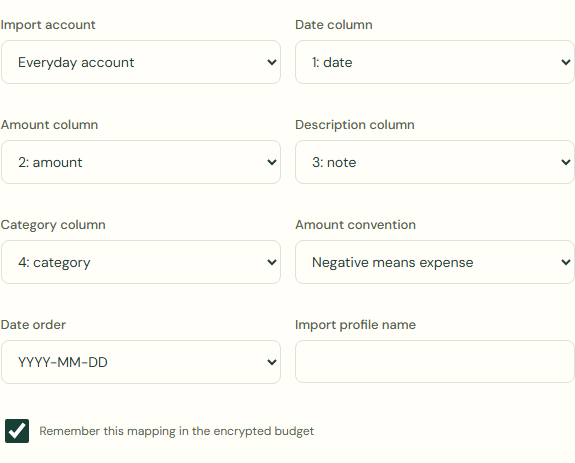
- Complete Import account.
Steps
- Complete Date column.
- Complete Amount column.
- Complete Description column.
- Complete Category column.
- Complete Amount convention.
- Complete Date order.
 Enlarge screenshot
What should happen
Review every page. Choose the cash treatment per row for mixed history and new activity. Dates before the opening balance never change cash; a balance review does not automatically classify imported history.
Only income and expense types can be imported. Exclude other types and record them separately.
Transfer or split: exclude this row and record it separately with the correct type.
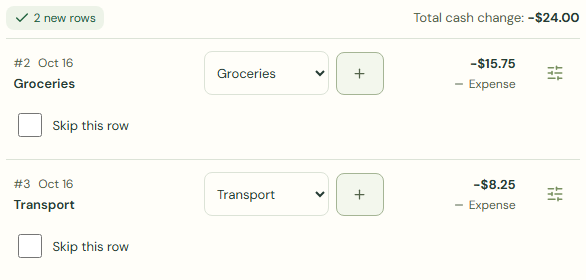
- Check Total cash change.
- Choose I reviewed the mapping, duplicates and cash effects..
- Choose Import reviewed rows.
- Check Your transactions.
- Check Current balance.
 Enlarge screenshot
Worked example
Example balance: $1,000.00 − $25.50 = $974.50.
- Choose Everyday account for Import account.
- Check Amount column.
- Check Amount convention.
- Check Date order.
- Check Total cash change.
- Choose I reviewed the mapping, duplicates and cash effects..
- Choose Import reviewed rows.
Amount: -$15.75, -$8.25
Total cash change: -$24.00
Current balance: $974.50 − $24.00 = $950.50
Common mistakes and fixes
Review every page. Choose the cash treatment per row for mixed history and new activity. Dates before the opening balance never change cash; a balance review does not automatically classify imported history.
- Check Import account.
- Check Amount convention.
- Check Date order.
- Check Total cash change.
Wait for save confirmation. If an error appears, correct it before continuing.